# Admin Recovery API
When a Kafka group coordinator enters a `FAILED` state, all operations for the affected consumer groups return `not_coordinator`, leaving consumers stuck in `initializing` indefinitely — even after pod restarts. This page describes how to diagnose coordinator failures, assess their blast radius, and either mitigate the impact immediately or recover committed offsets and restore normal operation using `Karafka::Admin::Recovery`.
## Admin Recovery API / Background: Coordinator Failures
Each consumer group maps deterministically to a partition of the internal `__consumer_offsets` topic via Java's `String#hashCode` modulo the partition count. The broker leading that partition acts as the group coordinator. When that broker enters a degraded state, every consumer group it coordinates becomes unreachable.
Coordinator failures can be triggered by a variety of broker-side conditions, including but not limited to:
- **Log compaction races** — compaction running during a coordinator reload can produce epoch conflicts in `__consumer_offsets`, causing the coordinator shard to transition to `FAILED` state (e.g. [KAFKA-19862](https://issues.apache.org/jira/browse/KAFKA-19862))
- **Out-of-memory conditions** — loading a very large, uncompacted `__consumer_offsets` partition can exhaust broker heap (e.g. [KAFKA-19716](https://issues.apache.org/jira/browse/KAFKA-19716))
- **Broker crashes and unclean restarts** — a broker that crashes mid-write may leave the `__consumer_offsets` partition in a partially consistent state
- **Network partitions** — a broker isolated from the cluster may become the stale leader for coordinator partitions, causing `not_coordinator` responses until leadership is re-established
- **Rolling restarts and maintenance windows** — managed Kafka services (MSK, Confluent Cloud) perform automatic broker rolling restarts that trigger coordinator reloads, which can surface any of the above conditions
In `FAILED` state, every group operation (`JoinGroup`, `SyncGroup`, `OffsetCommit`, `DeleteGroup`) returns `not_coordinator`. The affected group appears empty in Karafka Web UI, fresh pods joining the group get stuck the same way, and restarting consumer deployments does not help. Other consumer groups whose coordinator partitions are on healthy brokers continue working normally.
!!! note "Cluster-level condition"
Coordinator failures are a Kafka broker condition, **not** a Karafka condition. No consumer framework can recover automatically when the coordinator itself is unavailable or in a `FAILED` state. The tools on this page allow you to work around the failure without waiting for the broker to self-heal.
!!! warning "No error-level reporting from Karafka"
When a coordinator is in a `FAILED` state, Karafka will not emit any errors to its error tracking pipeline. The consumer simply stays in `initializing` indefinitely with no indication of why. The `not_coordinator` responses are only visible in librdkafka debug logs, which require explicitly enabling debug logging (`debug: 'all'`). Without debug logs enabled, the only observable symptom is that consumers never receive assignments. See the [Confirming the Root Cause](#confirming-the-root-cause) section below for the full diagnostic procedure.
## Admin Recovery API / Confirming the Root Cause
The first step is confirming that the coordinator is the problem and identifying which broker and `__consumer_offsets` partition are involved. The observed symptoms are:
- Consumers stay in `initializing` state and never receive partition assignments
- Karafka Web UI shows the consumer group as empty with no members
- `rdkafka` logs report `not_coordinator` errors
- Other consumer groups on the same cluster work normally
- Restarting consumer pods does not resolve the issue
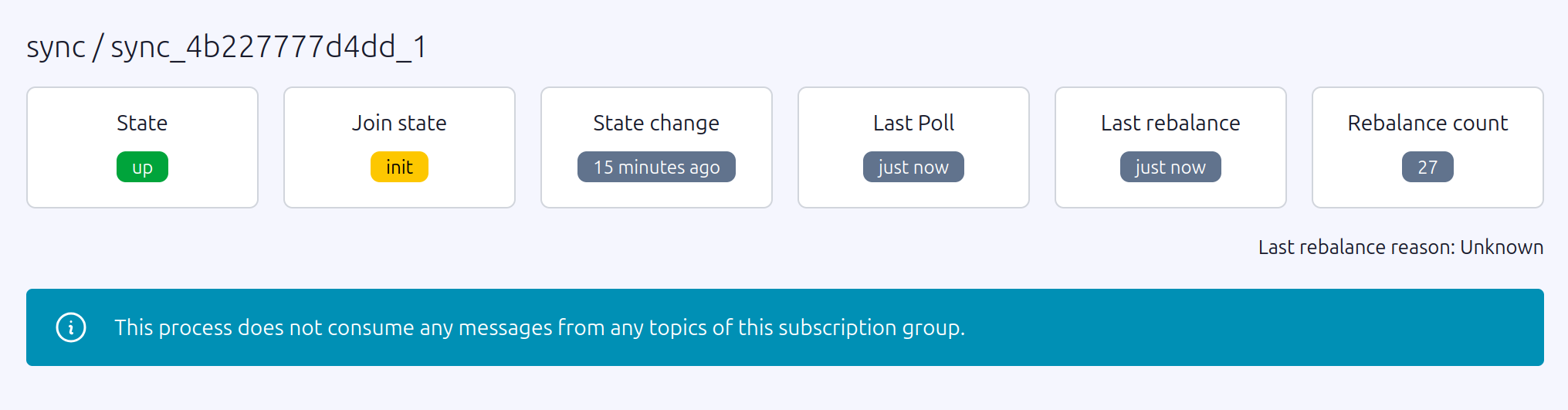
When librdkafka debug logging is enabled (`debug: 'all'`), the client-side log will show a repeating cycle of `JoinGroup` failures and coordinator re-queries with no progress:
```log
rdkafka: [thrd:main]: JoinGroup response: GenerationId -1, Protocol , LeaderId , my MemberId , member metadata count 0: Broker: Not coordinator
rdkafka: [thrd:main]: GroupCoordinator/1: JoinGroupRequest failed: Broker: Not coordinator: actions Refresh
rdkafka: [thrd:main]: Group "sync": Rejoining group without an assignment: JoinGroup error: Broker: Not coordinator
rdkafka: [thrd:main]: 127.0.0.1:9092/1: Group "sync": querying for coordinator: Broker: Not coordinator
rdkafka: [thrd:127.0.0.1:9092/1]: 127.0.0.1:9092/1: Sent FindCoordinatorRequest (v2, 32 bytes @ 0, CorrId 15)
rdkafka: [thrd:127.0.0.1:9092/1]: 127.0.0.1:9092/1: Received FindCoordinatorResponse (v2, 31 bytes, CorrId 15, rtt 0.21ms)
rdkafka: [thrd:main]: 127.0.0.1:9092/1: Group "sync" coordinator is 127.0.0.1:9092 id 1
rdkafka: [thrd:main]: GroupCoordinator/1: Heartbeat for group "app" generation id 9
```
Notice that `FindCoordinator` resolves successfully and the broker responds with a coordinator address — the broker itself is reachable. The group still fails to join because the coordinator shard is in a `FAILED` state and rejects every `JoinGroup` request. Other groups (such as `app` in the last line) continue heartbeating normally on the same broker, confirming the issue is isolated to the coordinator partition for the affected group.
On AWS MSK, search broker logs in CloudWatch to confirm the coordinator is in a `FAILED` state:
```shell
aws logs filter-log-events \
--log-group-name "msk/broker-logs/" \
--log-stream-names "-Broker-" \
--filter-pattern '"Failed to load metadata from __consumer_offsets-"' \
--region us-east-1 \
--query 'events[].message' --output text
```
A coordinator epoch conflict produces errors of this form:
```log
ERROR Replaying record ... from __consumer_offsets- at offset
failed due to: Cannot set the epoch of - to
because the partition is still owned at epoch .
ERROR [GroupCoordinator id=] Failed to load metadata from
__consumer_offsets- with epoch due to java.lang.RuntimeException
```
For other failure modes such as OOM or unclean restarts, look for heap exhaustion or fatal exception stack traces in the same log stream around the time of the incident.
## Admin Recovery API / Blast Radius Assessment
A single broker can lead multiple `__consumer_offsets` partitions, meaning a single coordinator failure can affect many consumer groups at once. Before attempting recovery, use `Karafka::Admin::Recovery` to map the full blast radius.
It is important to understand what each step returns here. `affected_partitions` returns partition numbers of the internal `__consumer_offsets` topic — **not** your application topics. These are the coordinator shards hosted on the failing broker. From those partition numbers you can derive the affected consumer group names, and from the group names you can identify which of your application topics are impacted by cross-referencing against your Karafka routing configuration. The full chain is:
**failing broker → `__consumer_offsets` partition numbers → consumer group names → your application topics**.
1. Find the coordinator for a known-broken group:
```ruby
coordinator = Karafka::Admin::Recovery.coordinator_for('my-broken-group')
# => { broker_id: 5, broker_host: "b-5.cluster.kafka.us-east-1.amazonaws.com:9096", partition: 5 }
```
The returned hash contains the broker ID, its `host:port` address, and the `__consumer_offsets` partition number the group maps to. This partition number is an internal coordination detail — it is **not** a partition of any of your application topics.
1. Find all `__consumer_offsets` partitions led by that broker:
```ruby
partitions = Karafka::Admin::Recovery.affected_partitions(coordinator[:broker_id])
# => [5, 12, 27, 38]
```
This returns the partition numbers of `__consumer_offsets` that the failing broker leads. Any consumer group whose coordinator maps to one of these partition numbers is potentially impacted. Returns an empty array for a broker ID that does not exist in the cluster.
1. Enumerate all consumer groups affected across those partitions:
```ruby
lookback = Time.now - 3600 # look back 1 hour
affected_groups = partitions.flat_map do |partition|
Karafka::Admin::Recovery.affected_groups(partition, last_committed_at: lookback)
end.uniq.sort
```
`affected_groups` scans each `__consumer_offsets` partition and returns the distinct consumer group IDs that have committed offsets within the lookback window. Groups whose offsets have been fully tombstoned are excluded. Results are sorted alphabetically.
1. Identify your affected application topics. The group names returned in the previous step are the consumer groups defined in your Karafka routing configuration. Cross-reference them there to find which application topics are affected:
```ruby
# Example: inspect your routing to see what each affected group subscribes to
Karafka::App.routes.each do |consumer_group|
next unless affected_groups.include?(consumer_group.name)
topics = consumer_group.topics.map(&:name)
puts "Group '#{consumer_group.name}' → topics: #{topics.join(', ')}"
end
```
This gives you the full picture: which application topics have stopped being consumed and which teams or services need to be notified.
You can also look up the `__consumer_offsets` partition for any specific group directly, which is useful for pre-flight checks before recovery:
```ruby
Karafka::Admin::Recovery.offsets_partition_for('my-group')
# => 5
```
## Admin Recovery API / Recovery Using `Karafka::Admin::Recovery`
`Karafka::Admin::Recovery` reads committed offsets directly from the raw `__consumer_offsets` log, entirely bypassing the group coordinator. This makes it possible to rescue committed progress from a broken group and restore it to a new, healthy group without any broker-level intervention.
### Admin Recovery API / Recovery Using `Karafka::Admin::Recovery` / Reading Committed Offsets
`read_committed_offsets` scans the `__consumer_offsets` partition for the given group and returns its last committed position for every topic-partition it tracked:
```ruby
recovered = Karafka::Admin::Recovery.read_committed_offsets(
'my-broken-group',
last_committed_at: Time.now - 600 # group was last healthy ~10 minutes ago
)
# => { "orders" => { 0 => 14921, 1 => 15004 }, "payments" => { 0 => 8830 } }
```
The `last_committed_at` parameter defines the earliest point in time the scan will consider. Only offset commit records written at or after this timestamp are included. The scan uses last-write-wins semantics — if the same topic-partition appears multiple times within the window, only the most recent non-tombstone value is returned. Results are sorted alphabetically by topic and numerically by partition.
Choosing the right value for `last_committed_at` is important. Setting it too recent risks missing the last committed offsets if the coordinator failed before they were flushed. Setting it too far in the past is generally safe — earlier records are simply overwritten by later ones due to last-write-wins — but on a very active group with a large `__consumer_offsets` partition it increases scan time.
A practical approach is to reason from what you know about the incident:
- **If you know when the coordinator failed**, use that timestamp minus ten to fifteen minutes. This gives enough buffer to capture the last successful commits even if there was a lag between the failure and when it was noticed.
- **If the failure time is uncertain**, start with a one to two hour lookback. If the returned offsets look plausible (not suspiciously old), they are good to use. If they are further back than expected, the group may have had low commit frequency or the failure happened earlier than assumed.
- **If the group processes high-throughput topics**, committed offsets are written frequently and a shorter lookback of five to ten minutes before the known failure time is usually sufficient.
- **If the group processes low-throughput topics** where commits happen infrequently, extend the lookback window generously — potentially several hours — to ensure you capture the most recent commit rather than an empty result.
When in doubt, err on the side of a longer lookback. The scan is read-only and has no side effects.
!!! warning "Scope of the scan"
`read_committed_offsets` reads from `__consumer_offsets` directly. The reliability of the returned offsets depends entirely on what was durably committed before the coordinator failed. If consumers were mid-batch at the time of failure, some recent progress may not be reflected.
### Admin Recovery API / Recovery Using `Karafka::Admin::Recovery` / Migrating to a New Consumer Group
The recovery workflow is intentionally two-step: inspect the recovered offsets first, then commit them to a target group. This lets you validate the data before making any permanent changes.
```ruby
# Step 1: Read from the broken group — bypasses the coordinator entirely
recovered = Karafka::Admin::Recovery.read_committed_offsets(
'my-broken-group',
last_committed_at: Time.now - 600
)
puts recovered.inspect
# Validate the offsets look correct before proceeding
# Step 2: Commit to a new group with a healthy coordinator
Karafka::Admin::ConsumerGroups.seek('my-broken-group-v2', recovered)
```
After committing, update your consumers to use the new group name and scale them back up. The new group resumes from the recovered offsets rather than resetting to `auto.offset.reset`.
When choosing a new group name, keep in mind that coordinator assignment is deterministic. Use `coordinator_for` to verify the new name lands on a healthy broker before committing:
```ruby
target = Karafka::Admin::Recovery.coordinator_for('my-broken-group-v2')
puts "New group maps to broker #{target[:broker_id]} (#{target[:broker_host]})"
```
!!! warning "Consumer group name change"
Migrating to a new group name is a permanent change. Update your Karafka routing configuration, monitoring dashboards, alerting rules, and consumer group lag tooling to reference the new name.
## Admin Recovery API / Alternative: Direct Assignments
[Direct Assignments](https://karafka.io/docs/Pro-Consumer-Groups-Direct-Assignments) offer a fundamentally different approach: rather than recovering and migrating the broken group, you reconfigure consumers to use the `assign` API instead of `subscribe`. This skips `JoinGroup` and `SyncGroup` entirely — the coordinator is never contacted, so its state is irrelevant. Consumers connect directly to specific topic-partitions and start processing without any group membership negotiation.
```ruby
routes.draw do
topic 'my_topic' do
consumer MyConsumer
assign true # take all partitions directly, no coordinator involved
end
end
```
You can also assign a specific subset of partitions if you need finer control:
```ruby
routes.draw do
topic 'my_topic' do
consumer MyConsumer
assign [0, 1, 2, 3]
end
end
```
This is best used as an immediate operational bypass to restore consumption while the cluster issue is being investigated and resolved in parallel. It is the fastest path back to processing — no group migration, no broker operations, no tombstone writes required.
The important trade-off is that Direct Assignments operate entirely outside of Kafka's consumer group offset tracking. Since there is no coordinator, Kafka does not manage committed offsets on your behalf. You are responsible for determining the correct starting position for each partition and for persisting progress externally if needed. A practical approach during recovery is to pair Direct Assignments with `read_committed_offsets` to seed the correct starting offset:
```ruby
# Read the last known-good offsets from the broken group
recovered = Karafka::Admin::Recovery.read_committed_offsets(
'my-broken-group',
last_committed_at: Time.now - 600
)
# In your consumer, use the recovered offsets to seek before processing
class MyConsumer < ApplicationConsumer
def consume
# Your processing logic here — offset position was seeded externally
end
end
```
Once the coordinator is healthy again, you can transition back to a standard subscribed group by removing the `assign` directive and pointing consumers at a group name that has been pre-seeded with the correct offsets via `Karafka::Admin::ConsumerGroups.seek`.
## Admin Recovery API / Alternative: Kafka CLI Recovery Playbook
When a cluster-level repair is necessary, or as a fallback if the above approach cannot be used in a specific environment, the following Kafka CLI procedure forces a fresh coordinator load on a healthy broker, deletes the stuck group to write tombstones that neutralize conflicting records, and then restores the original leader layout.
This requires Kafka CLI tools (`kafka-reassign-partitions`, `kafka-leader-election`, `kafka-consumer-groups`), available in any standard Kafka distribution image such as `confluentinc/cp-kafka:8.0.2`.
1. Identify the coordinator partition. Find which `__consumer_offsets` partition your group maps to. The mapping uses Java's `String#hashCode` semantics:
```ruby
group_name = 'my-broken-group'
group_name.chars.reduce(0) { |h, c| (31 * h + c.ord) & 0xFFFFFFFF } % 50
```
Then confirm the current leader and replica set:
```shell
kafka-topics \
--bootstrap-server $BOOTSTRAP \
--command-config client.properties \
--describe --topic __consumer_offsets \
| grep "Partition: "
```
Note the `Leader` and `Replicas` values — you will need both for subsequent steps.
1. Move the partition leader to a healthy broker. Create a `reassignment.json` that places a different broker first in the replica list. For example, if the current replicas are `[5,4,6,1,2,3]`, put broker 4 first:
```json
{"version":1,"partitions":[{"topic":"__consumer_offsets","partition":5,"replicas":[4,5,6,1,2,3],"log_dirs":["any","any","any","any","any","any"]}]}
```
```shell
kafka-reassign-partitions \
--bootstrap-server $BOOTSTRAP \
--command-config client.properties \
--execute \
--reassignment-json-file reassignment.json
kafka-reassign-partitions \
--bootstrap-server $BOOTSTRAP \
--command-config client.properties \
--verify \
--reassignment-json-file reassignment.json
kafka-leader-election \
--bootstrap-server $BOOTSTRAP \
--admin.config client.properties \
--election-type PREFERRED \
--path-to-json-file election.json
```
Where `election.json` is:
```json
{"partitions": [{"topic": "__consumer_offsets", "partition": 5}]}
```
This triggers a fresh coordinator load on broker 4. Verify the new leader before proceeding:
```shell
kafka-topics \
--bootstrap-server $BOOTSTRAP \
--command-config client.properties \
--describe --topic __consumer_offsets \
| grep "Partition: 5"
```
1. Delete the stuck consumer group. The group must have no active members. Scale down consumers first, then delete the group:
```shell
kubectl scale deploy my-consumer --replicas=0
kafka-consumer-groups \
--bootstrap-server $BOOTSTRAP \
--command-config client.properties \
--delete --group my-broken-group
```
The delete operation writes tombstone records to `__consumer_offsets` that neutralize the conflicting assignment records. When the original broker later reloads the partition, the tombstones cause it to skip the conflicting records and produce a clean load.
1. Restore the original partition leader. Create `reassignment-rollback.json` with the original replica order and execute the same reassignment and leader election sequence from step 2.
Scale consumers back up once the original broker is confirmed as leader. Consumers will restart from `auto.offset.reset` since committed offsets were removed along with the group.
!!! warning "Offset loss"
Deleting the consumer group removes all committed offsets. Coordinate with your team to pause production before deleting and be prepared to re-process or skip messages consumed since the last known-good offset. To avoid this, use `Karafka::Admin::Recovery` to read and preserve the offsets before deletion, then restore them to the new group via `Karafka::Admin::ConsumerGroups.seek` after recovery.
## Admin Recovery API / Caveats and Recommendations
**Broker reboots are not a durable fix.** Rebooting a failing coordinator broker can temporarily succeed — the reload may land on a clean path — but the underlying condition in `__consumer_offsets` remains. The failure will recur on the next leadership change to that broker unless the root cause is addressed.
**File a support ticket with your managed Kafka provider.** For managed services such as MSK or Confluent Cloud, report the coordinator failure with the relevant broker logs. Known bugs of this class have fixes available in newer Kafka patch versions, and providers should be pushed to roll out the patch promptly.
**Verify ISR health before any reassignment operation.** Ensure all replicas are in-sync before moving partition leadership. A reassignment with an incomplete ISR risks availability:
```shell
kafka-topics \
--bootstrap-server $BOOTSTRAP \
--command-config client.properties \
--describe --topic __consumer_offsets \
| grep "Partition: "
```
Proceed only when `Isr` matches `Replicas`.
**Partition reassignment is metadata-only.** Moving `__consumer_offsets` leadership within the existing ISR does not move any data and carries no risk of under-replication, provided you keep the same broker set and replication factor.
---
*Last modified: 2026-03-22 21:47:20*